Deploy free5GC helm in Minutes: The Ultimate One-Script Setup Guide
Welcome to the free5GC helm quick setup guide! If you are using the free5gc-helm to deploy your k8s environment. Here is a new method which is more convenient to setup a new helm in new machine.
Note
This ansible script is used for quick setup at an empty machine. If you have already setup previously, please refer to free5gc-helm for customized operation.
Prerequisites
- CPU: AMD or Intel CPU.
- OS: Ubuntu 20.04, 22.04, 24.04, or 25.04.
- Tools: The
gitcommand must be installed on your system.
In this quick setup scrip, we will use ansible to run the whole installation. As a result, it can be deploy on both remote machine and local machine.
Install ansible:
sudo apt update
sudo apt install -y software-properties-common
sudo add-apt-repository --yes --update ppa:ansible/ansible
sudo apt install -y ansible
Get the Ansible book
The ansible files is placed under our free5GC repo.
git clone https://github.com/free5gc/free5gc
Setup Your Destination Machine
In the file, free5gc/ansible-helm/inventory.ini, you have to specify the destination machine you want to setup the free5gc-helm.
[k8s]
<host IP> work_node=<host name>
Run the Script
cd free5gc
./quick-setup-helm.sh
ansible will use ssh to do the install operation in the target machine so you will be asked about the user and user password.
Ansible will help you to install:
- microk8s
- kubectl
- helm
- k9s
- enable required addons in microk8s
- gtp5g
-
free5gc-helm
- core network chart
Result
Ansible will show if there is failed task:

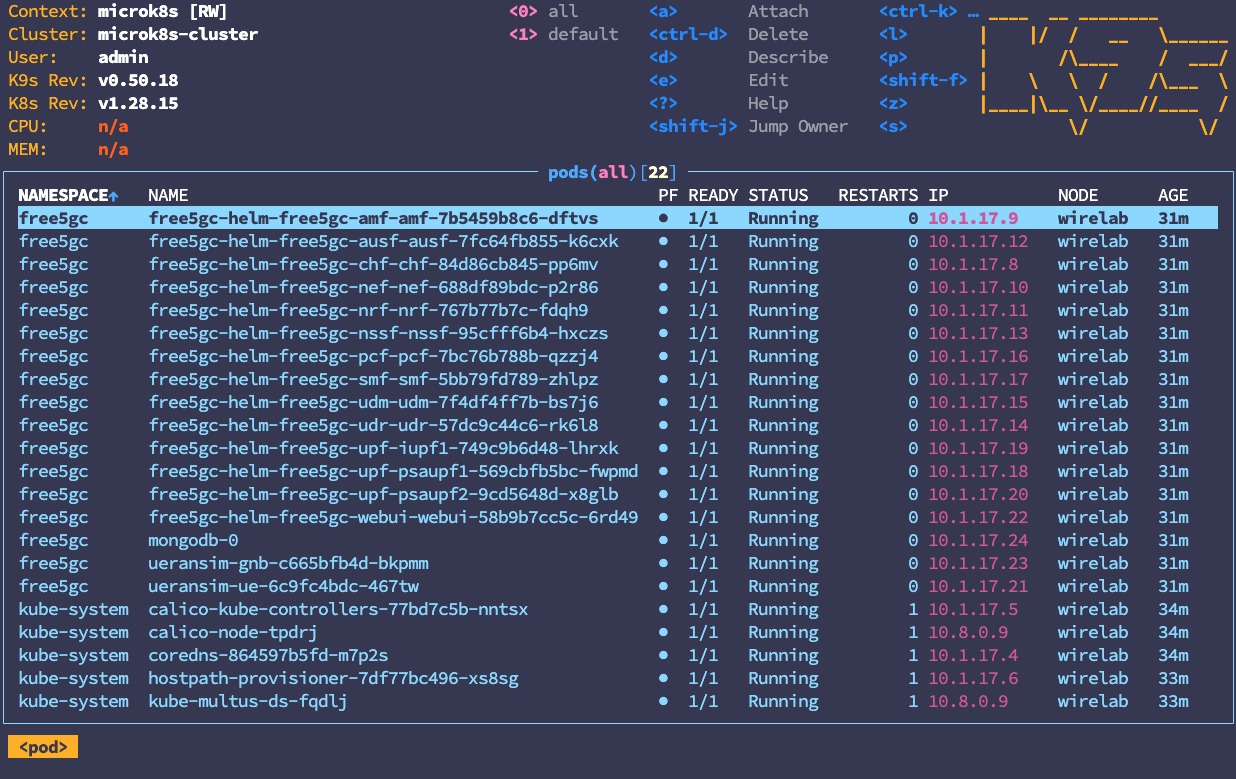
After installed, use k9s -A to check all pods are running:
RAN/UE test
free-ran-ue
free-ran-ue's helm chart is a submodule under free5gc-helm/charts. So it is necessary to get the source by:
cd free5gc-helm
git submodule update --init
Then use exec command to enter the pod:
kubectl exec -it -n free5gc fru-freeranue-ue-xxxxxxxxxx-xxxxx -- sh
Run UE simulator:
./free-ran-ue ue -c config/ue.yaml
Ping test(open another terminal):
ping -I ueTun0 1.1.1.1 -c 5
It is expected to see:
PING 1.1.1.1 (1.1.1.1) from 10.60.0.1 ueTun0: 56(84) bytes of data.
64 bytes from 1.1.1.1: icmp_seq=1 ttl=48 time=3.99 ms
64 bytes from 1.1.1.1: icmp_seq=2 ttl=48 time=3.85 ms
64 bytes from 1.1.1.1: icmp_seq=3 ttl=48 time=3.70 ms
64 bytes from 1.1.1.1: icmp_seq=4 ttl=48 time=3.63 ms
64 bytes from 1.1.1.1: icmp_seq=5 ttl=48 time=3.95 ms

--- 1.1.1.1 ping statistics ---
5 packets transmitted, 5 received, 0% packet loss, time 4005ms
rtt min/avg/max/mdev = 3.632/3.823/3.993/0.140 ms
UERANSIM
cd free5gc-helm
helm install -n free5gc ueransim ./charts/ueransim